Converge Reminders — text message (SMS) program
In short: Converge Reminders are text messages that tell you when a reminder you set to reply to an email is due. You only receive them if you opt in with your mobile number in Converge. Message frequency varies by how many reminders you set. Message and data rates may apply. Reply STOP at any time to opt out, or HELP for help.
1. What the program is
Program name: Converge Reminders.
What you receive: one text message for each reminder to respond that you set in Converge, sent when the reminder comes due. A message looks like:
Converge reminder: time to reply to "Q3 budget" from Accounts Payable (alex@northwind.com). Reply STOP to opt out, HELP for help.
Converge Reminders are transactional, account-related notifications that you ask for by setting a reminder. We do not send marketing or promotional text messages, and we never send a text to anyone who has not opted in.
2. How to opt in
Only you can opt in, and only from inside your own Converge account:
- Sign in to Converge on the web or in the app and open Settings.
- Under Text message reminders, enter your mobile number.
- Read the disclosure and tick the consent box. The box is never pre-ticked, and agreeing is not a condition of using Converge or of any purchase.
- Choose Turn on text reminders.
This is the form, in the web app and in the phone app (the number shown is an example):
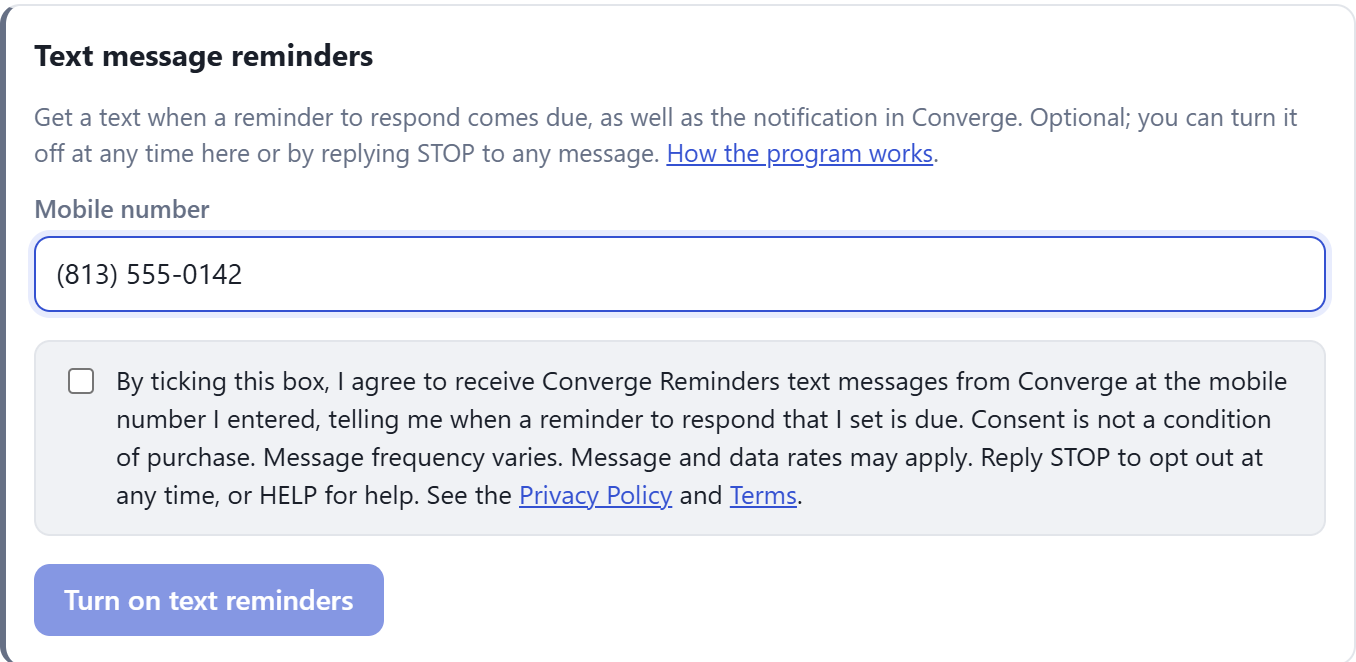
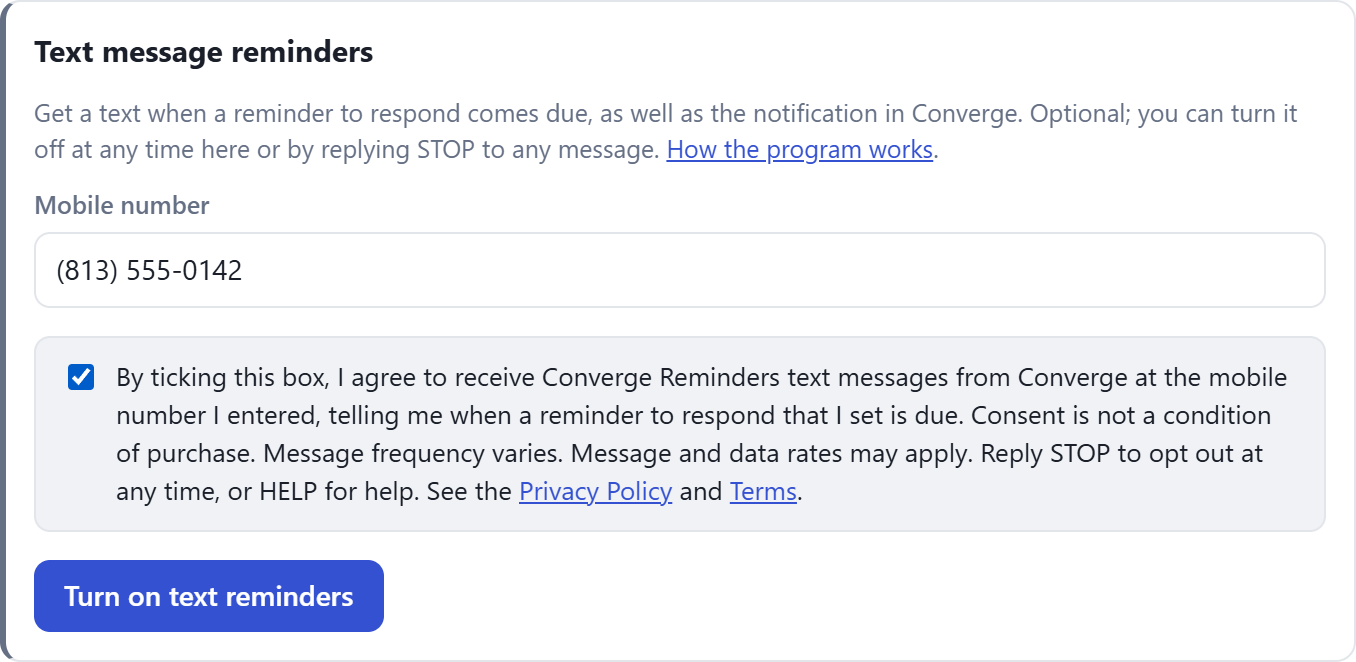
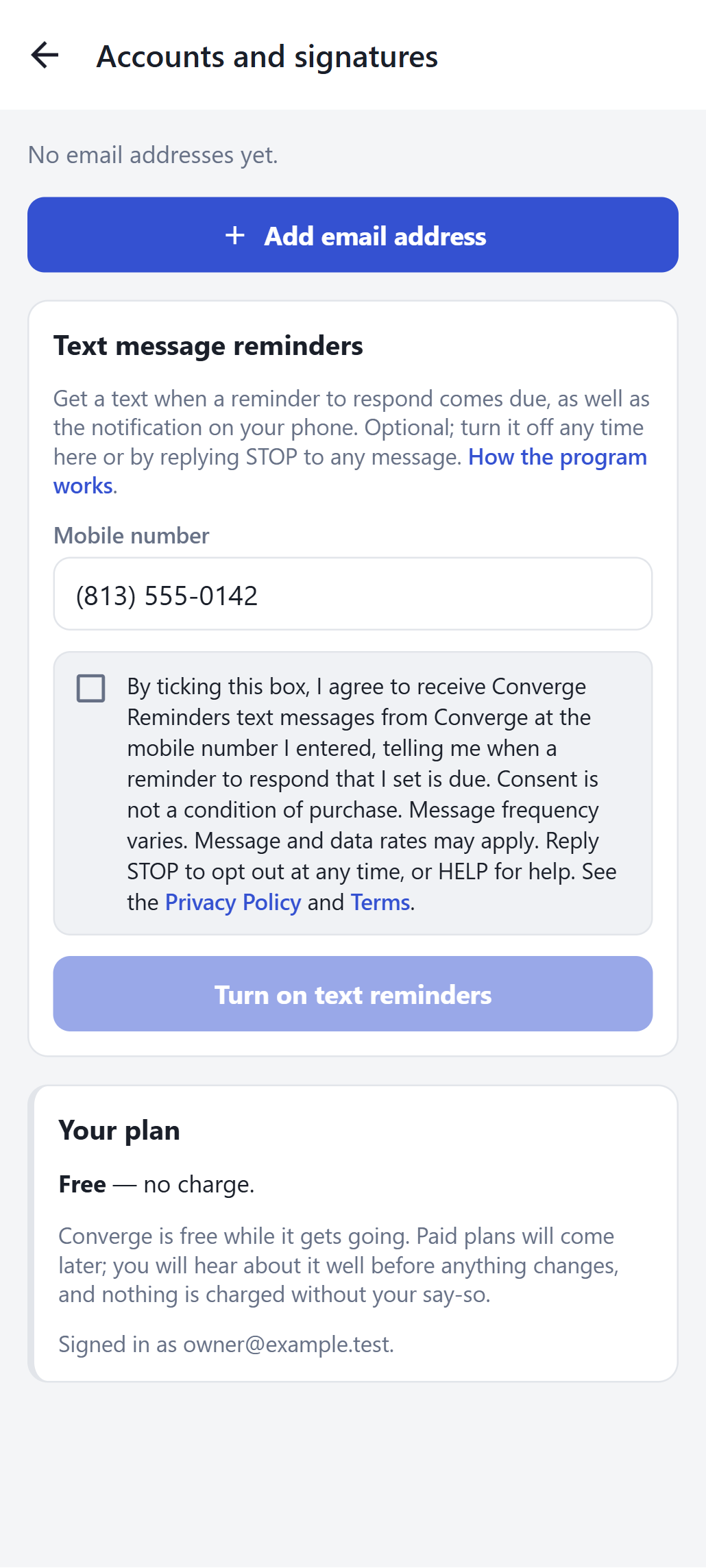
The disclosure you agree to reads:
“By ticking this box, I agree to receive Converge Reminders text messages from Converge at the mobile number I entered, telling me when a reminder to respond that I set is due. Consent is not a condition of purchase. Message frequency varies. Message and data rates may apply. Reply STOP to opt out at any time, or HELP for help. See the Privacy Policy and Terms.”
You then receive one confirmation text:
Converge Reminders: you are opted in to text reminders when a reply you set a reminder for is due. Msg frequency varies. Msg & data rates may apply. Reply HELP for help, STOP to opt out.
We record the number you entered, the time you agreed and the network address the request came from, so that we can show your consent if asked.
3. How to opt out
You can stop Converge Reminders at any time, in either of two ways:
- Reply STOP to any Converge text message. You will receive one final message confirming that you have been unsubscribed, and no further messages will be sent to that number. (The words STOPALL, UNSUBSCRIBE, CANCEL, END and QUIT work the same way.)
- In Converge, open Settings → Text message reminders and choose Turn off text reminders. Your number and consent record are removed straight away.
Opting out of text messages does not affect your Converge account, your reminders (which still appear in Converge and as app notifications), or any other way you have chosen to be notified. To receive texts again, simply opt in again in Settings.
4. How to get help
Reply HELP to any Converge text message for program information and contact details, or contact us directly:
- Email: support@convergemail.com
- Web: www.convergemail.com/sms (this page)
5. Message frequency, rates and carriers
- Frequency: varies. You receive one message per reminder you set, when it comes due. If you set no reminders, you receive no messages.
- Cost: Converge does not charge for text messages. Message and data rates may apply under your mobile plan; check with your carrier.
- Carriers: Converge Reminders are available on major U.S. carriers. Carriers are not liable for delayed or undelivered messages.
- Compatibility: you need a mobile phone that can receive SMS. Delivery depends on your carrier and coverage; a reminder may be delayed or not arrive, so do not rely on text messages alone for anything critical.
6. Your privacy
Your mobile number is used only to send the reminders you asked for. No mobile information will be shared with third parties or affiliates for marketing or promotional purposes. Your text messaging originator opt-in data and consent are never shared with any third party. We use Twilio as our messaging provider to deliver the messages; Twilio processes your number for that purpose only. Full details are in our Privacy Policy.
7. Changes to the program
If we change this program in a way that affects you, we will tell you in Converge and update the effective date above. The Terms and Conditions apply to the program as well.